
Made a mistake in a completed payrun
Updated May 23, 2026 · 3 min read · Reviewed by The Payroll Success Team at Humanised
On this page
This article is for owners and admins who use Humanised
Overview
-
Why a clean payroll history is important
-
What can you do if you realise you made a mistake after completing a payrun
Why a clean payroll history is important
Humanised payroll has afforded its users a few more opportunities to rectify their mistakes than most payroll software. We recognize that payroll professionals often face impossible situations when the already confirmed payroll needs to be reedited. Sometimes due to requests from their clients (clients of payroll service providers), other departments in their organisation or employees themselves.
Therefore, there is an option of archiving and redoing a monthly payrun. Before we tell you how to do that, we want you to know that the following scenarios are sensitive to what you are about to do
-
APIT Table 2 tax calculations – According to the tax table 2, tax amounts paid monthly, and as lump sum are factored in to make sure employees doesn’t pay more than they owed. Therefore, at any given month you have to make sure that the payruns for that financial year, starting from April, are maintained properly so that Humanised can do this complicated calculation for you.
-
Reports – Make sure you maintain a clean payrun history so that you can reap the benefits of your tiny work when downloading T10 and Annual statement of employer reports. Similarly, system generate custom reports also will need a well-kept payrun history to generate accurate results
-
Future reference – You yourself will have the peace of mind of being able to view all your payruns in one place, knowing full well that the payrun history indeed accurately describes the payruns to date.
Made a mistake in a completed payrun?
Good news is you can do something about it. But make sure that you are aware of the following scenarios
-
Paid payrun – If you have already paid the employees (atleast some employees) with a faulty payrun. We strongly recommend rectifying the mistakes in the next months payrun without archiving the current one. You have already processed the payrun for that month, you have used the bank file it generated, payslips are sent. Redoing a payrun in such a scenario complicates your payrun history making the whole problem difficult to revisit in the future.
-
New employees – if you have new employees who joined after the month you want to rectify, you will be given the option of including that new employee in the previous month’s payroll even though they have joined after that pay cycle. Therefore, exercise caution when selecting which employees are needed in the draft payrun.
How to fix a mistake in a completed payrun?
-
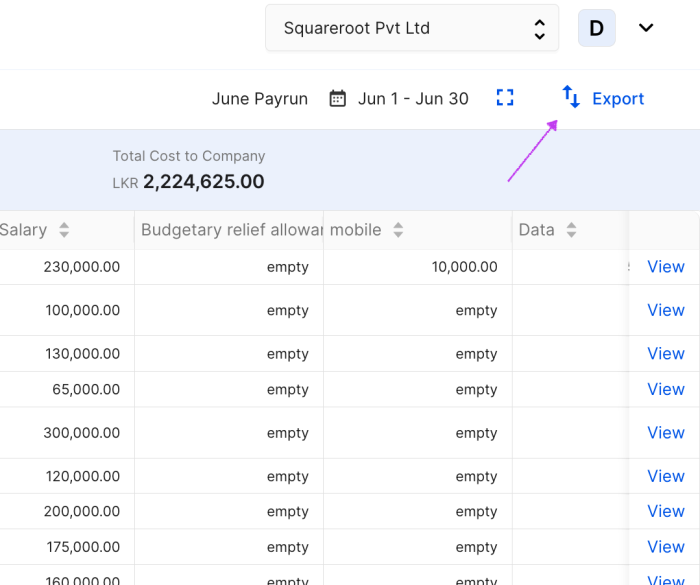
Step 1 – Download a copy of the completed file with the error. You can do this by getting an export of the existing file.
-
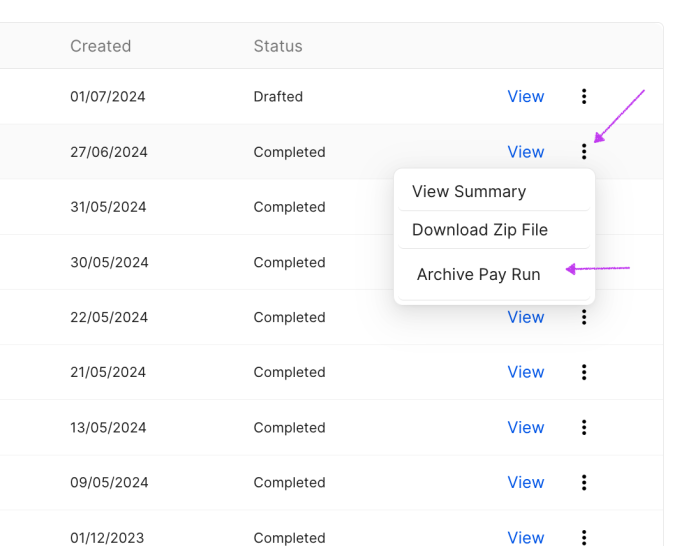
Step 2 – Archive the completed error payrun. (You can only have one monthly payrun per pay cycle)
-
Step 3 – Create new payrun. You can create a new payrun using system data or use the export you just got to create the new payrun. If you don’t want to do the previous edits once more, you can use the export
What’s next?:
Was this article helpful?
Your feedback helps us improve these guides.
Keep reading
More guides in Payroll.
- Automated APIT calculations in payrunLearn how to automate table 1, 2, 5, 6, 7 and non cash benefits tax calculations with Humanised→
- Calculate EPF and ETF in payrunHere’s how Humanised make sure EPF and ETF are calculated correctly for your employees. Read more on how…→
- Payrolls pegged to a foreign currency with a foreign base currencyLearn how to run a pegged payrun when you are base currency is foreign→
Still need a hand?
A real human on our team will look at your ticket and come back to you — typically within a few working hours.
Open a support ticket