Run a payroll using system data

Updated May 23, 2026 2 min read Reviewed by The Payroll Success Team at Humanised

On this page
  1. Step 1 – Update employee details (if applicable)
  2. Step 2 – Update organizational settings
  3. Step 3 – Create draft payrun
  4. Step 4 - Review and complete payrun
  5. Step 5 - Pay your employee salaries!


This article is for Owners and admins who use Humanised

Overview

Step 1 – Update employee details (if applicable)

Now you’ll have an up-to-date database to run payrolls from.

Step 2 – Update organizational settings

If there are any changes to payroll policy, make those changes in organizational settings

Step 3 – Create draft payrun

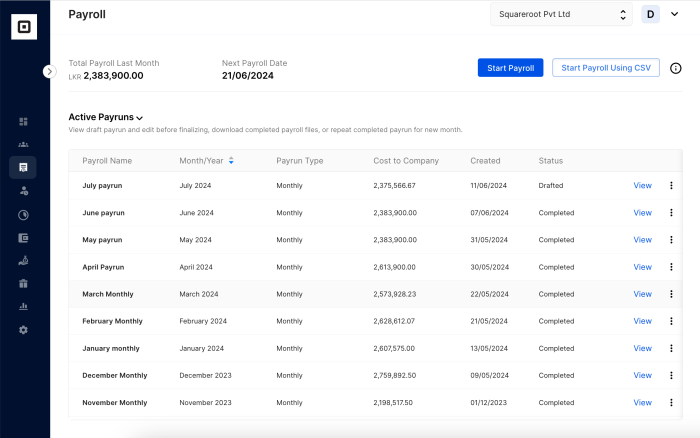
Payroll home page
Figure 1 – Payroll home page

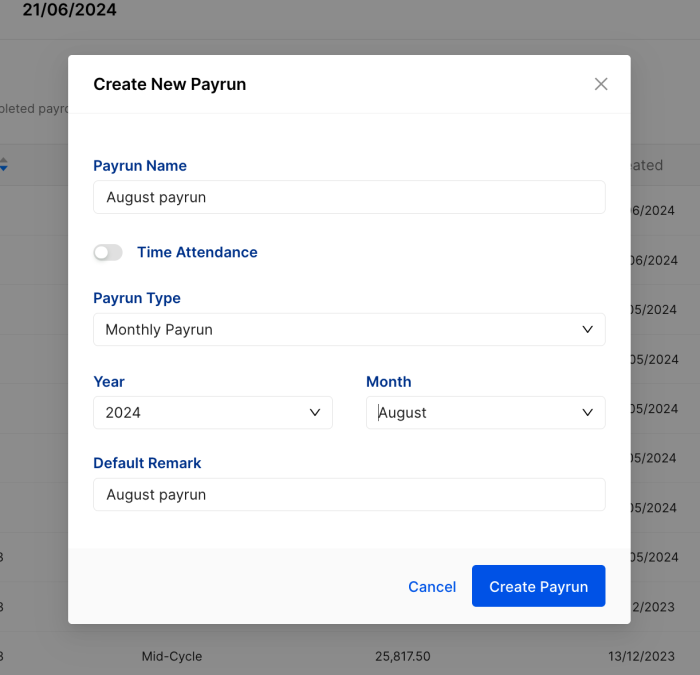
Create payrun window
Figure 2 – Create new payrun

First the system will calculate EPF, ETF and APIT automatically according to your preset preferences. Then it’ll make the necessary deductions and statutory calculations to come up with the “net salary” and “cost to company” for each employee and for the whole organization. If there are any stamp duties, pro-rated salaries or any other additional calculations set up by you all those will also get added as pay items to relevant emplyees.  

Step 4 – Review and complete payrun

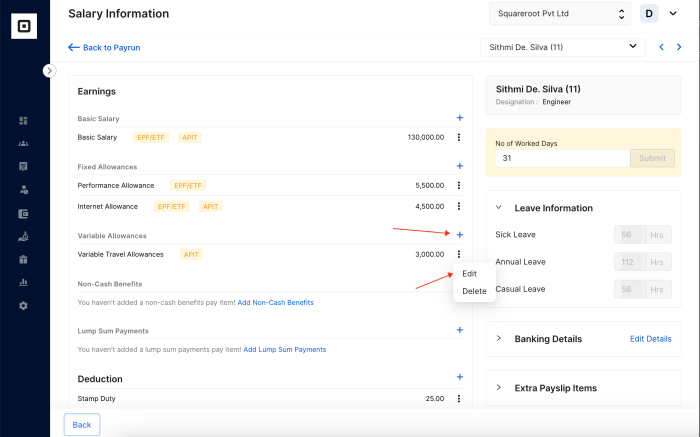
Add and update pay items
Figure 2 – Create new payrun

Step 5 – Pay your employee salaries!

The payroll summary page will load with the following information.

Was this article helpful?

Your feedback helps us improve these guides.

Thanks for the feedback — glad it helped.

Still need a hand?

A real human on our team will look at your ticket and come back to you — typically within a few working hours.

Open a support ticket