
How Time & Attendance Works: From Check-In to Accurate Payroll
See how a modern time & attendance system works in Sri Lanka — biometric, mobile app, and browser check-ins flow through manager approval into accurate overtime and no-pay payroll calculations.
On this page
- What is a time and attendance system?
- The real cost of doing this manually
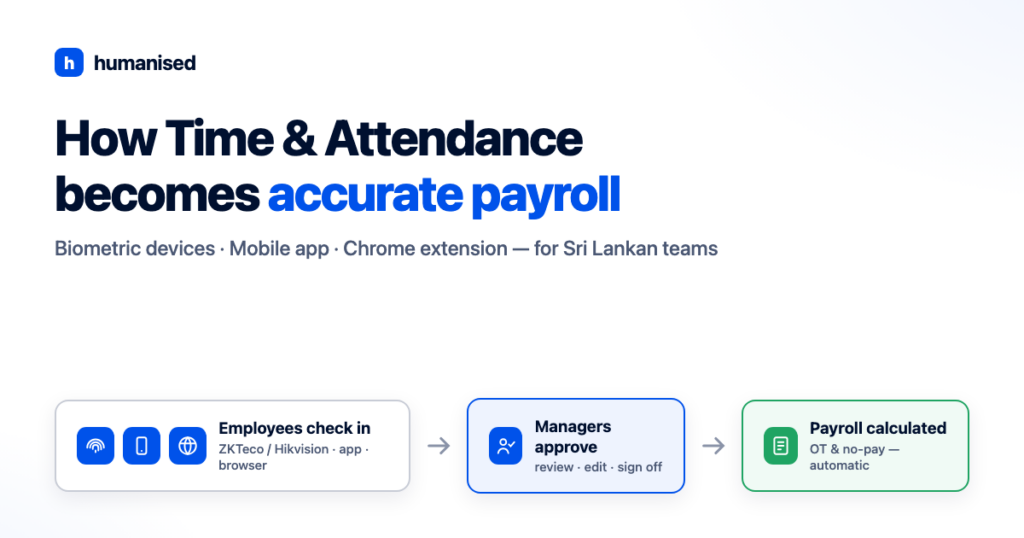
- How it works in Humanised: four steps from check-in to payroll
- Step 1 — Employees check in, whichever way suits your workplace
- Step 2 — The system turns punches into time logs
- Step 3 — Managers review, fix, and approve
- Step 4 — Payroll confirms, and the calculations run themselves
- "Can't employees just cheat the system?"
- Where this leaves your payroll
- Frequently asked questions
If your month-end still involves downloading logs from a fingerprint machine, pasting them into Excel, and squinting at late arrivals before payroll can run, this post is for you. Here is exactly how a modern time and attendance system works — from the moment an employee checks in to the moment payroll calculates their overtime — using Humanised as the example.
What is a time and attendance system?
A time and attendance system records when employees start and finish work, compares those times against their assigned shifts, leave, and holidays, and turns the result into payroll-ready data. Instead of attendance living in one place (a machine, a register, a spreadsheet) and payroll living in another, the two are connected: approved attendance flows straight into overtime and no-pay calculations.
That connection is the whole point. Attendance tracking on its own tells you who was late. Attendance connected to payroll makes sure every late arrival, extra hour, and absent day is reflected in the salary — accurately, and without anyone re-typing numbers.
The real cost of doing this manually
Most Sri Lankan SMEs we meet are not missing attendance data — they have plenty of it. The problem is what happens between the data and the payslip:
- Re-entry errors. Someone exports the fingerprint machine’s log, reformats it in Excel, and manually works out late minutes and overtime hours. One wrong cell and an employee is over- or under-paid.
- Approval by memory. A manager “remembers” that an employee was at a client site that Tuesday. Maybe. There’s no record, so payroll guesses.
- Inconsistent policy. Overtime is rounded generously one month and strictly the next, depending on who does the calculation. Employees notice, and trust erodes.
- Days of month-end work. The whole reconciliation can consume the payroll admin for days — every single month.
Under Sri Lanka’s Shop and Office Employees Act, overtime for covered employees is generally paid at 1.5 times the normal hourly rate, and Wages Board trades have their own rules. Getting these calculations wrong isn’t just an accounting annoyance — it’s a compliance and employee-trust problem. (We’ve covered the calculation details in how to accurately calculate overtime and no-pay deductions in payroll.)
How it works in Humanised: four steps from check-in to payroll
Step 1 — Employees check in, whichever way suits your workplace
Humanised’s time and attendance tracking accepts check-ins from three sources, and you can mix them across one organisation:
- Biometric devices (ZKTeco and Hikvision). If your office or factory already uses a ZKTeco or Hikvision fingerprint or face-recognition device — the two most common brands in Sri Lanka — Humanised connects to it directly. Punches flow into the system in real time. No more downloading logs with a pen drive.
- The Humanised mobile app. Field staff, delivery teams, and employees at client sites check in from the Humanised employee app on their own phone. Each mobile check-in is GPS-verified, so managers can see where it happened.
- The Humanised Chrome extension. Office and remote staff working at a computer check in straight from their browser — no device hardware needed. Browser check-ins can be restricted to approved devices and networks.
A construction firm might run biometric devices at the site office, the mobile app for supervisors moving between sites, and the Chrome extension for the accounts team. All three feed the same attendance record.
Step 2 — The system turns punches into time logs
Raw check-ins alone don’t tell you much. Humanised matches every punch against three things:
- The employee’s assigned shift or roster — so “8.42 a.m.” becomes “12 minutes late” for an 8.30 shift, and perfectly on time for a 9.00 shift. (See shift and roster management.)
- Approved leave — an employee on approved annual leave is never marked absent, so leave and attendance never contradict each other.
- The organisation’s holiday calendar — public and Poya holidays are handled according to your calendar, not treated as unexplained absences.
The output is a clean daily time log per employee: worked hours, late minutes, early departures, overtime hours, and absences — computed, not typed.
Step 3 — Managers review, fix, and approve
No system sees everything. An employee forgets to punch out; another spends the afternoon at a customer’s office. So before anything touches payroll, admins and managers review the time logs and can edit or add entries with a record of who changed what.
Then they approve. Approval is the quality gate: it replaces “the manager remembers” with an explicit, recorded sign-off on every employee’s time for the period.
Step 4 — Payroll confirms, and the calculations run themselves
Finally, the payroll admin confirms the approved time logs into payroll. This is where the earlier steps pay off: Humanised calculates overtime and no-pay deductions automatically, using your organisation’s own policies — overtime rates, grace periods, no-pay rules, working-hour definitions.
Those policies aren’t something you have to build yourself. The Humanised team configures them with you during onboarding, based on your actual employment terms. From your first payroll run, the calculations follow your rules — the same way, every month.
The month-end reconciliation that used to take days becomes a review-and-confirm task, and the numbers on the payslip trace back to real, approved check-in data.
“Can’t employees just cheat the system?”
It’s the first question every owner asks, and it deserves a straight answer. Biometric devices already prevent buddy punching on-site — a fingerprint can’t be handed to a friend. For check-ins that happen off the device, mobile punches are GPS-verified and browser check-ins can be limited to approved devices and networks. And because managers approve time logs before payroll, anything that looks wrong gets caught by a human before it costs you money.
Where this leaves your payroll
Accurate payroll isn’t produced at month-end; it’s produced every day, one verified check-in at a time. When attendance, shifts, leave, holidays, and payroll policies all live in one system:
- Overtime and no-pay are calculated consistently, per your policies and Sri Lankan employment rules.
- Employees trust their payslips, because late minutes and extra hours are recorded — not estimated.
- Your payroll admin gets their month-end back.
If you’d like to see the full flow with your own shifts and policies, book a free demo with the Humanised team — we’ll walk you through check-in to payslip in about 30 minutes.
Frequently asked questions
How does a time and attendance system work with payroll?
Employees record check-ins through biometric devices, a mobile app, or a browser extension. The system compares those times against assigned shifts, approved leave, and holidays to build time logs. Managers approve the logs, and payroll then calculates overtime and no-pay deductions automatically from the approved data — no manual re-entry into spreadsheets.
Can Humanised connect to our existing fingerprint machine?
Yes — Humanised connects to ZKTeco and Hikvision biometric devices, the two most widely used brands in Sri Lanka. Punches flow into the system in real time, with no manual downloading of logs.
Can employees fake their check-ins on the mobile app?
Mobile check-ins are GPS-verified, and browser check-ins can be restricted to approved devices and networks. Combined with on-site biometric devices and manager approval of time logs, fake check-ins are impractical.
How is overtime calculated in Sri Lanka?
For shop and office employees, overtime is generally 1.5 times the normal hourly rate for hours beyond standard working hours; Wages Board trades follow their own rules. Humanised applies your configured overtime policy to approved time logs automatically.
Who sets up our overtime and no-pay policies?
The Humanised team configures your overtime, no-pay, shift, and holiday policies during onboarding, so calculations match your employment terms from the first payroll run.
Was this article helpful?
Your feedback helps us improve these guides.
Thanks for the feedback — glad it helped.