Complete employee profiles with onboarding forms.

Updated May 23, 2026 2 min read Reviewed by The Payroll Success Team at Humanised

On this page
  1. Step 1: Send the onboarding form
  2. Step 2: Review Pre-filled Information (After submission)
  3. Step 3: Complete the profile


This article is for Owners and admins who use Humanised

Overview

Humanised Payroll system offers a digital onboarding solution. Send out onboarding forms, and your new hires can complete their information online.

Step 1: Send the onboarding form

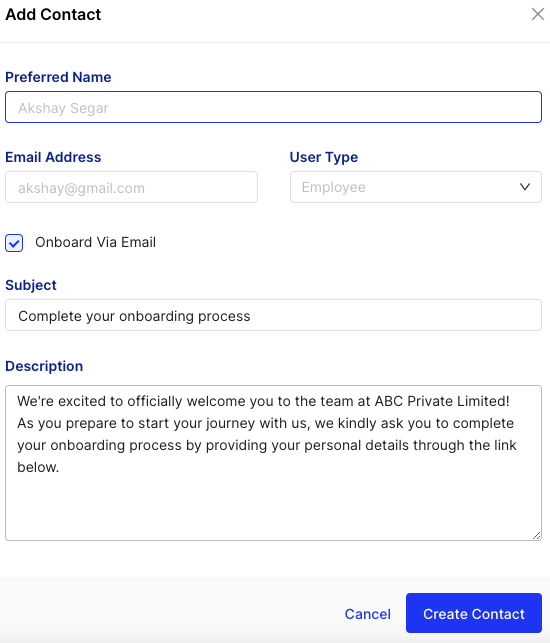
Figure 1 -How to send the onboarding form

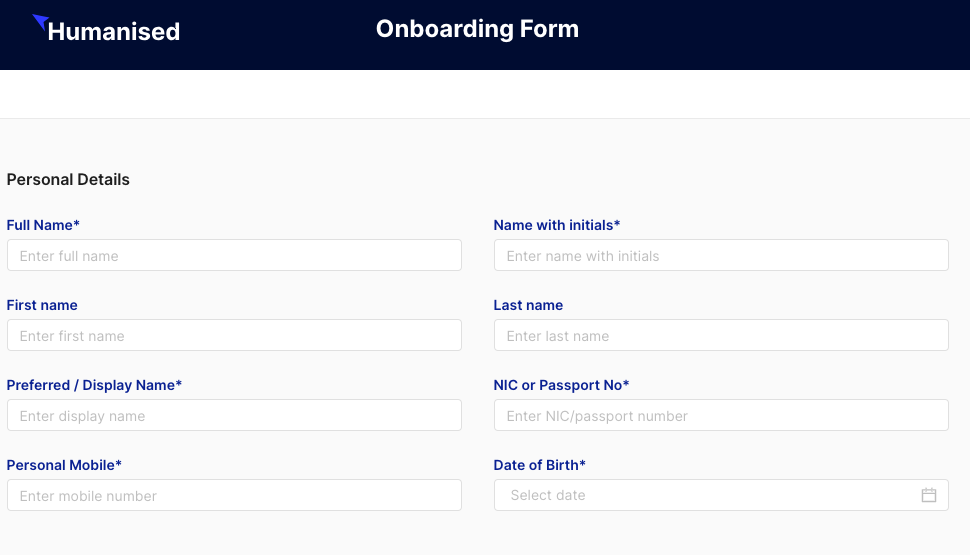
Figure 2- Onboarding form that the user receives

Figure 3 – How the status is shown in the system

Step 2: Review Pre-filled Information (After submission)

Step 3: Complete the profile

Following the review of pre-populated information from the onboarding form, you may need to complete a few additional sections within the employee profile.

Double Check:

Matching names: Make sure their name matches exactly with their official documents (EPF/ETF, APIT)

Payslip delivery: If they want their payslip online, update their email in “Bank Details.” 

Settings: Check the “Settings” section for things like access. 

What’s next?:

Was this article helpful?

Your feedback helps us improve these guides.

Still need a hand?

A real human on our team will look at your ticket and come back to you — typically within a few working hours.

Open a support ticket