How to give access
Updated September 21, 2026 · 2 min read · By The Payroll Success Team at Humanised
On this page
This article is for Owners and admins who use Humanised
Overview
-
Invite users with the appropriate access levels to the system.
Humanised Payroll system empowers administrators with the ability to assign user roles and permissions. This ensures appropriate access to HR system functionalities, optimizing data security and streamlining workflows.
Inviting Owner (Contact Support):
If you are trying to change the owner, you will have to get in touch with us after following the steps listed below. Please note that the existing owner will be changed to a user.
- Onboard the individual to the system as a user.
- Send an email to didulani@humanisedventures.com with the following information:
- Username of the new owner (as it appears in the system)
- Employee ID of the new owner (the number displayed at the top of the URL within their employee profile)

Inviting Admins:
-
Go to the Contact section.
-
Go to the relevant employee profile.
-
Click on Settings.
-
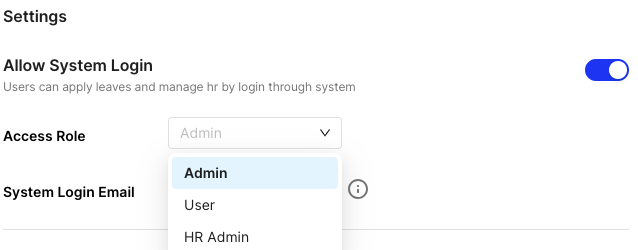
Select “Admin” from the access role dropdown menu.
-
Enter the employee’s email address.
-
Switch on the toggle in the top right corner to send an invitation email.
-
Inform your employees to check their inbox for a password reset email. They can then set a new password and log in.
Inviting HR Admins or Users:
-
Go to the Contact section.
-
Go to the relevant employee profile.
-
Click on Settings.
-
Choose the appropriate access role (HR Admin or User) from the dropdown menu.
-
Enter the employee’s email address.
-
Switch on the toggle in the top right corner to send an invitation email.
-
Inform your employees to check their inbox for a password reset email. They can then set a new password and log in.
What’s next?:
Was this article helpful?
Your feedback helps us improve these guides.
Keep reading
More guides in Contacts.
- Complete employee profile accuratelyBoth manual employee profile creation and bulk upload options of the HR system only capture mandatory data initially.…→
- Add employees using the systemHumanised Payroll system prioritizes a streamlined onboarding experience. The system allows for the seamless addition of new hires,…→
- Complete employee profiles with onboarding forms.Humanised Payroll offers a digital onboarding solution. Send out onboarding forms, and your new hires can complete their…→
Still need a hand?
A real human on our team will look at your ticket and come back to you — typically within a few working hours.
Open a support ticket