
Before: Exporting the device report to Excel
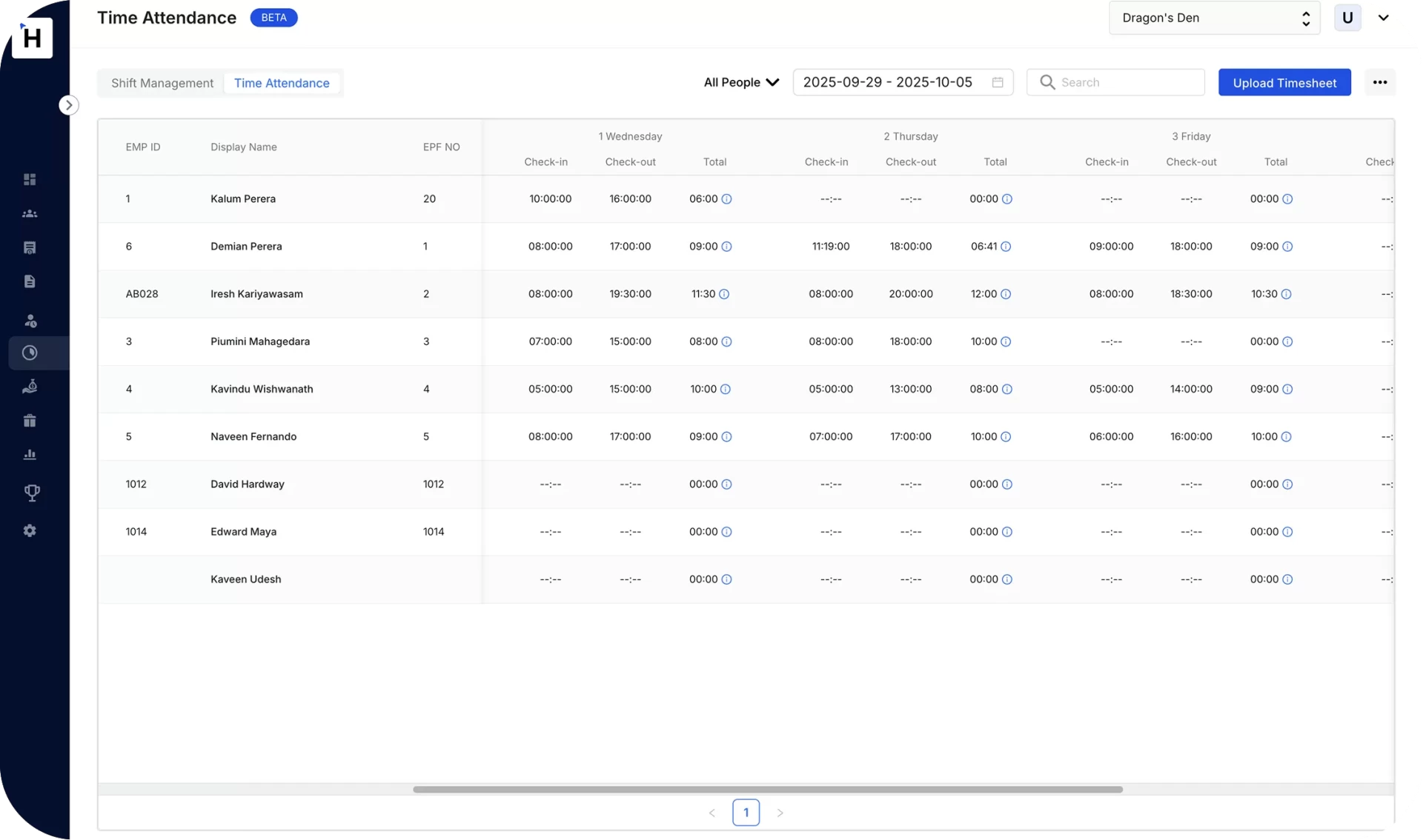
With Humanised: Punches from ZKTeco and HikVision sync on their own.

Fingerprint machine · GPS app · Browser clock-in
Staff clock in on a fingerprint machine, the GPS app or the browser. Humanised turns every punch into overtime, late marks and no-pay. Then it sends the hours to payroll. One branch or fifty.
Free 20-minute demo with your own shifts and rules. We call you the next working day.
Trusted by businesses across Sri Lanka









A fingerprint machine only records the punch. Someone still turns it into pay. Humanised does that part for you.
Before: Exporting the device report to Excel
With Humanised: Punches from ZKTeco and HikVision sync on their own.
Before: Working out overtime by hand
With Humanised: Overtime, Poya and holiday rates applied for you.
Before: Arguments over late marks and no-pay
With Humanised: Your grace period and late rules, the same for everyone.
Before: Field staff you cannot check on
With Humanised: GPS check-in that only counts inside the site geofence.
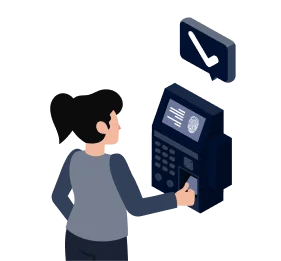
Fingerprint or face machine at the door, GPS app in the field, browser at the desk. Every punch lands in one account.

Humanised compares the punch with the roster: on time, late, early out, overtime, or absent.
Overtime at your rates, late marks and no-pay under your policy, leave from the same record, Poya days never counted as absent.
The manager approves the month in the app. Hours, OT, no-pay and allowances post to the pay run with no retyping.
Pick the method that fits each site or team. Mix them in one company. Every punch goes through the same shift, overtime and leave rules.
ZKTeco and HikVision fingerprint, face and RFID terminals. Keep the device you have, or buy one from LKR 22,000. Humanised reads the punches; the device add-on is LKR 36,000 a year per terminal.
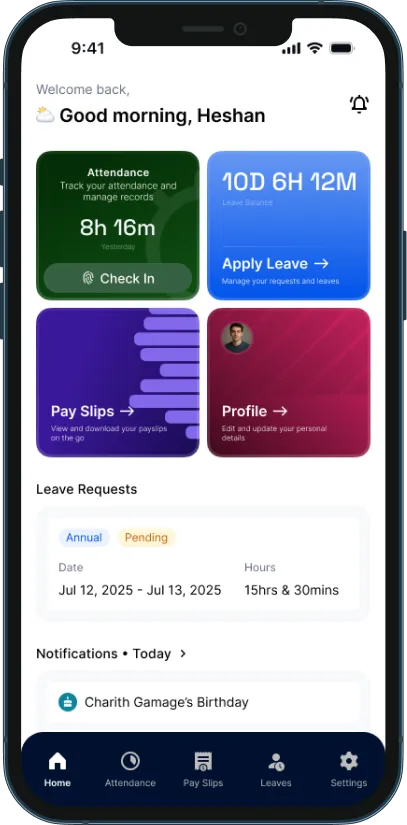
Fingerprint attendance system →Sales reps, drivers, technicians, security guards and remote staff check in on the employee app. Draw a geofence around each site and a check-in only counts inside it. Small Business and Enterprise plans.
GPS attendance app →Office and work-from-home staff clock in and out from a computer. No device, no app needed. The punch goes through the same rules as every other.
Employee app and self-service →Local holidays, local overtime rules and local devices are built in.
Businesses across Sri Lanka run attendance and payroll in Humanised, from 5-person teams to companies with hundreds of staff.


“The biggest improvements have been in efficiency and accuracy. Payroll processing is now faster and more reliable, and the system ensures better compliance with regulations.”

Sasindu, Accounting & Finance Manager, Planlogic
ZKTeco and HikVision terminals work with Humanised as they are. Fingerprint, face and RFID punches flow into attendance and payroll with no manual export. Supported models and the device add-on price are on the fingerprint attendance system page.

A fingerprint or face device only records the punch. Humanised is the software that turns punches into pay. For a brand we do not connect to directly, upload the attendance file the device exports.


Attendance and leave come with every plan, together with payroll.
LKR 8,333/month, billed yearly
LKR 100,000 a year, billed yearly only. Up to 15 staff.
 Browser clock-in; fingerprint machines as an add-onOvertime, late and no-pay rulesLeave and payroll included
LKR 25,000/month
Up to 50 staff.
Everything in StartupGPS check-in with geofencingMultiple work locationsCustom
Above 50 staff.
Everything in Small BusinessAny number of branches and devicesCustom reports and integrationsConnecting a ZKTeco or HikVision terminal is an add-on of LKR 36,000 a year per device. See full pricing and add-ons.
Yes. Humanised reads the punches from ZKTeco and HikVision fingerprint, face and RFID terminals you already own. No new hardware. For another brand, upload the attendance file the device exports and Humanised processes it the same way.
The software is from LKR 8,333 a month (billed yearly) for up to 15 employees, attendance included. Connecting a fingerprint or face terminal is LKR 36,000 a year per device, on any plan, with no setup fee.
On the Humanised employee app, with GPS. You draw a geofence around each site, and a check-in only counts inside it. The location is saved with every punch so the manager can see where it was made. GPS check-in and geofencing are on the Small Business and Enterprise plans.
Yes. Office and remote staff can clock in and out in the browser as well as on the app. The punch goes through the same shift, overtime and late rules.
Yes. Put a terminal at each branch and give field staff the app. Every punch lands in the same Humanised account against the right employee and shift, and payroll runs once across all branches. Multiple work locations are on the Small Business and Enterprise plans.
Hours beyond the assigned shift are overtime. By default the hourly rate is monthly salary ÷ 240, as the Shop and Office Act regulations set it. Normal overtime is paid at 1.5×, Poya work at 1.5× and declared mercantile holidays at 2×. You can set your own divisor, rates and OT type instead.
Yes. You set the grace period, what counts as a late mark and what happens after a number of late marks, under your own policy. A day with no punch and no approved leave becomes no-pay at the daily rate you set, shown as its own line on the payslip.
Yes. Set the rule, for example an attendance allowance for a month with no absence or late mark. Humanised adds it to the pay run for the staff who earned it.
Yes. Leave and attendance are one record. A day on approved leave is never marked absent, leave beyond the balance becomes no-pay, and Poya days are never counted either way. See the leave management system.
The attendance register, overtime register and leave register, by employee, department or branch, for any date range.
Yes. Once the manager approves the month’s hours, overtime and no-pay, they post to the pay run with no retyping. Payroll closes with the attendance it was given.
The device holds the fingerprint template; Humanised receives the punch log, which is the employee ID and the time. You still need to tell staff what is collected and why. The biometric attendance guide covers the PDPA points.
The machine only records the punch. The software turns punches into pay. It matches each punch to a shift, works out overtime, late marks and no-pay under your rules, and sends the approved result to payroll.
Free. No card needed. Keep the fingerprint machine you already have.
Attendance guide
How branches, overtime, late marks and no-pay work, with a worked month and a comparison.
Most attendance problems start when a business has more than one site. Humanised is built for that case.
Example: a head office with a HikVision face terminal, three shops with a ZKTeco fingerprint machine each, and eight sales reps on the GPS app. Twelve clock-in points, one attendance record, one pay run. More on the multi-location attendance page, and for your industry: security companies, factories, retail chains, hotels and restaurants, construction.
| Rule | How you set it | Where it lands |
|---|---|---|
| Overtime | Hourly-rate divisor (240 by default), OT rate (1.5×), Poya rate (1.5×), mercantile holiday rate (2×), weekly OT limit | Overtime line on the payslip |
| Late arrival | Grace period in minutes, what counts as a late mark, what happens after a set number of late marks | Late register; deduction if your policy says so |
| Early departure and short leave | Minimum hours for a full day, short-leave allowance per month | Attendance register; no-pay if beyond the allowance |
| No-pay | Daily-rate divisor (30 by default); a day with no punch and no approved leave is no-pay | No-pay line with the days shown |
| Leave | Annual, casual, maternity and your own types, with first-year rules | Leave balance; approved leave is never marked absent |
| Attendance allowance and incentives | The condition, for example no absence and no late mark in the month, and the amount | Allowance line for the staff who earned it |
| Holidays | The Gazetted Poya and mercantile calendar is loaded for you; weekly holiday pattern per business | Holiday work paid at the holiday rate; a Poya day is never an absence |
| Shifts | Morning, evening and night patterns, including shifts over midnight, per site | Each punch judged against the right shift |
A shop assistant on LKR 60,000 a month, on the default rules: hourly rate LKR 250 (60,000 ÷ 240), daily rate LKR 2,000 (60,000 ÷ 30), 15-minute grace, attendance allowance of LKR 2,500 for a clean month.
| What the punches showed | Rule applied | Effect on pay |
|---|---|---|
| 8 hours beyond the shift on normal days | 8 × 250 × 1.5 | + LKR 3,000 |
| 4 hours worked on a Poya day | 4 × 250 × 1.5 | + LKR 1,500 |
| One day with no punch and no leave | 1 × 2,000 no-pay | − LKR 2,000 |
| Three late marks beyond the grace period | Half a day’s no-pay after three late marks, under the company policy | − LKR 1,000 |
| Attendance allowance | Not earned: one absence | LKR 0 |
| Two days’ approved annual leave | Paid leave, never marked absent | LKR 0 |
| Gross before EPF and APIT | 60,000 + 3,000 + 1,500 − 2,000 − 1,000 | LKR 61,500 |
The manager sees each line before approving. Change a divisor or a rate and the month recalculates. Check the figures yourself in the overtime calculator and the no-pay calculator.
Time and attendance software records when staff start and finish work and turns that into pay. Humanised takes the punch from a ZKTeco or HikVision machine, the GPS app or the browser, matches it to the employee’s shift, works out overtime, late marks, no-pay and any attendance allowance under the rules you set, keeps leave on the same record, and sends the approved month to payroll. It follows the Poya and mercantile holiday calendar and works across any number of branches.
| Feature | Humanised | Device vendor software only (ZKTeco BioTime, HikVision HikCentral) | MiHCM | Better HR |
|---|---|---|---|---|
| Price from | LKR 100,000/year (about LKR 8,333/month), up to 15 staff, includes payroll and leave | Device LKR 15,000–80,000 one-off; software licence varies | On request (Lite and Enterprise editions) | LKR 399 per employee/month (annual) |
| Payroll in the same system | Yes | No | Yes | Yes |
| Sri Lankan holiday and OT rules | Yes | Manual | Yes | Yes |
| Fingerprint and face machines | ZKTeco and HikVision | Own brand only | Yes | Yes |
| GPS app with geofencing | Yes, Small Business plan and above | Usually no | Ask vendor | Ask vendor |
| Browser clock-in | Yes | No | Ask vendor | Ask vendor |
| Several branches, one payroll | Yes | Each device separate | Ask vendor | Ask vendor |
| Leave on the same record | Yes | No | Yes | Yes |
| Shift rosters | Yes | Basic | Yes | Yes |
| Local support | Phone and WhatsApp, Sri Lanka | Reseller | Sri Lanka | Regional |
Competitor facts from their public websites and published listings, checked 3 September 2026. Humanised is our product. Detailed comparisons: Fingerprint machine prices in Sri Lanka, Humanised vs MiHCM, Humanised vs Better HR.